turnitin.com
BASICS for originality: What do TEACHERS do?
A. As a new user (one time only) Create a
user profile
- Type: instructor
- You will need account ID# and
account join password. (See Celeste)
- Supply the other information
requested. e-mail, password (student selects), first and last name,
country – Egypt, state (ignore)
NOTE:
Password- minimum 6 characters with letters and numbers combined.
B. Add your classes
1.
Click
the add a class link.
2.
Give
the class a name, enrollment password (ie, caccac), and ending date.
3.
Choose
Yes/No to have students view their own originality reports.
IMPORTANT:
In the table below, write down your class name, the given ID number. (ie, English
9 F), and enrollment password. You will need to give the students this ID
number. You can always recheck the ID numbers by logging in (as instructor)
again.
|
Class Name |
class ID number |
class enrollment password |
|
|
|
|
|
|
|
|
|
|
|
|
|
|
|
|
|
|
|
C. Add an assignment
Click the class’s name and create a new assignment link
D. Display a class’s
assignments and papers,
1. Click the class’s name.
2. Click inbox icon next to assignment (see below)

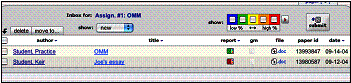
E. Display reports of students,
- Click report icon
- Choose side-by-side version
- Notice color chart.
No
problem with greens and blues.
**This program
also checks against other papers submitted by other students for this
assignment.
ÞNOTE: Please turn over for student
information!
Turnitin.com
BASICS for originality: What do STUDENTS do?
(You must tell/show them!)
F. As a new user (one time only) Create a
user profile
- Type: student
- class ID: give students the number
(see reverse side)
- class enrollment code: give students
the code (see reverse side)
- Students supply the other
information requested: e-mail, password (student selects), first and last
name, country – Egypt, state (ignore)
NOTE:
Password- minimum 6 characters with letters and numbers combined.
**Pretend you
are a student: login: practice@student.com (e-mail address), abc123
(password), class ID (choose your own class), class enrollment password (give
yours)
G. Enroll in a class
- Click enroll in a class link
- Type in class/section ID
- Type in enrollment password
- Submit
an assignment, (digital file)
1.  Click the submit icon next to the
assignment.
Click the submit icon next to the
assignment.
2.
Click Choose File and browse your hard drive where you saved it
3.
Click Submit
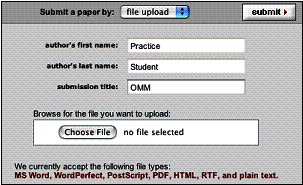
4.
Fill in the required information
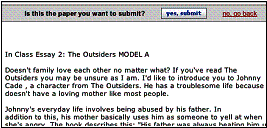
5. Click yes, submit if that’s the
correct paper.
Recommendation: Have the students hand in a printed
copy also, so teacher doesn’t have to print them all! (Ugh!)
Scholz Sep 04